Notifications
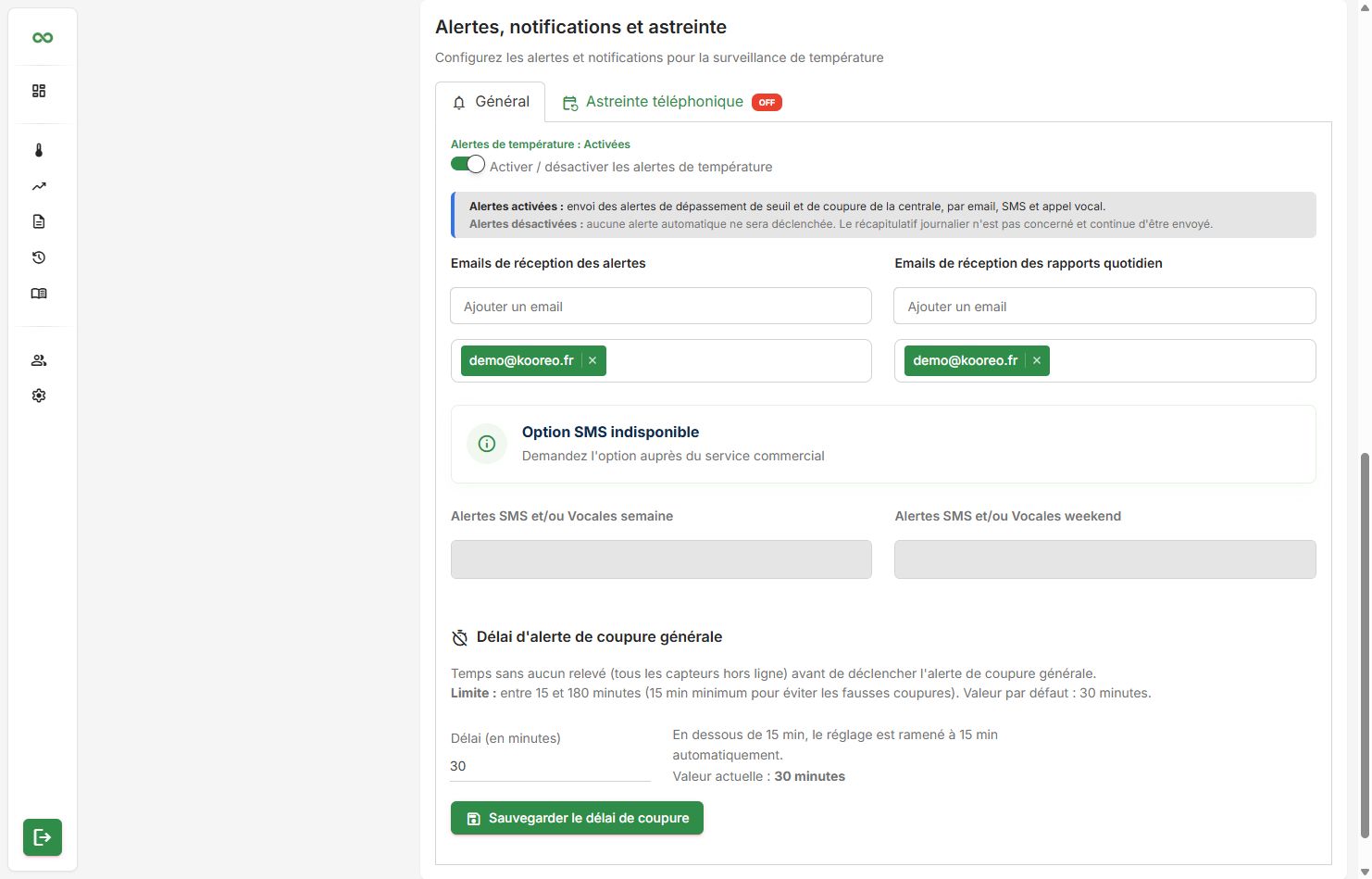
Settings(gear)→Alerts, notifications and on-call
This is not a CAP CONTROL sidebar item: open the gear icon at the top right. Two tabs: General and Phone on-call (if the option is in the plan).
Permissions
A standard user sees these settings as read-only. Only a customer administrator can change them.
Enable alerts
The Enable / disable temperature alerts switch controls sending:
- On: threshold breach and outage, by email, SMS and call (according to options).
- Off: no automatic sending. The daily summary is unaffected.
Each sensor also has its own Alerts switch (dashboard card or sensor form). Both must be on for an alert to go out.
Emails
- Alert recipient emails: added one by one.
- Daily report recipient emails: same idea.
SMS and voice
If the SMS option is subscribed: weekday and weekend numbers. Formats +33XXXXXXXXX or 06XXXXXXXX.
Otherwise a banner states that SMS is unavailable.
General outage delay
Time with no reading at all (every sensor offline) before the gateway outage alert.
- 15 to 180 minutes, default 30 minutes.
- Below 15 min, the value is raised to 15.
Distinct from each sensor's alert delay (threshold breach). Button Save outage delay.
The Phone on-call tab is described in Phone on-call.